The browser you loved to hate

0 comments
Internet Explorer 9 commercial. Check it out:


IE9 is really great with amazing performance. The test results are incredible.
You can download it from here.
Also, you can check out the IE10's preview which final version will be featured in the new Windows 8 OS.

Firefox Add-On: Who's Tracking You Online

2 comments
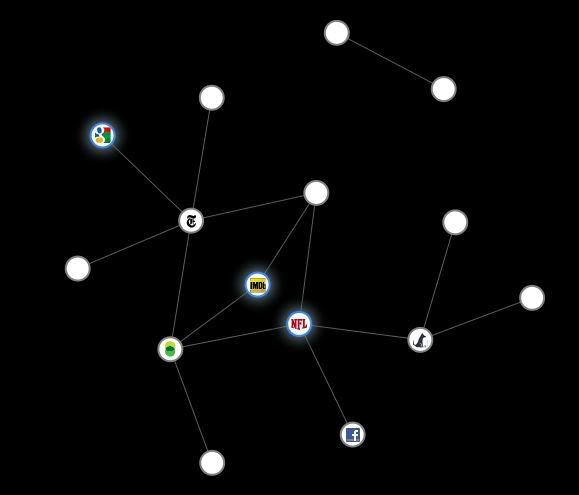
Mozilla Firefox launched a new add-on called Collusion which can help you see who's following your online activity. The browser extension creates a real-time graph. Every time you visit a new web site, the graph expands. It's based on cookies your browser download while you surf. Graph connects the same advertisers from different sites.

Each circle represents sites who's cookies you got from visiting sites shown in the glowing circles.
This is the graph after visiting the New York Times, imdb, and NFL.


This is the graph after going through a few Photobucket pages


After full session of surfing you will get very confused with so many circles. If you want to see tracking cookies from a single site, just select it's circle.

This video is showing how add-on works


If you want to install it head over to the Mozilla's web-site.
When you install it you should see small icon in the bottom right corner of your browser. If the add-on bar is not visible, right-click on New Tab sign ( + ) and select Add-on Bar

C Programming - I lesson

2 comments
There is bunch of C tutorials on the web but they are all written with the lack of compassion towards people who's 1st programming language happens to be C. My main goal is to simplify it so much that a 7 year old kid with the knowledge of alphabeth can understand it. To write and execute C written programs we need an Integrated Development Environment (IDE) for the C/C+ with GCC compiler. My first was Dev-C++ and I still use it sometimes because it's very simple. I will talk about IDE programs in a few days, now let's start with our first program:


#include <stdio.h>


int main (){


    printf("\nHello World\n");
               
return 0;
           }

Explanation:
#include - includes a group of functions from the filename between signs < and >
stdio.h - file that contains list of standard functions like printf
int main () - main function
{ and } - borders that group commands to one function, in this case to main function
printf - is a function for printing text between " and " on the screen
\n - command for moving onto the next line on the screen
; - a sign which means end of the standard function
return 0; - with this command we return a value 0 to the operating system telling him that our program is running successfully

That's it for today, if you have any questions let me know in the comments.
Next on the list are IDE programs.
 
Copyright © Megaraus Blogger Theme by BloggerThemes & newwpthemes Sponsored by Internet Entrepreneur