WinDirStat - Disk usage statistics viewer (FREE)
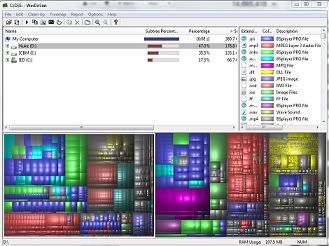 WinDirStat installation is quite small only about 631 KB. You can download it from http://windirstat.info. This program is free open source diagnostic tool and it's published under GNU Public License. When you start it, it reads all your drives at once and present it as a directory list with percentage stats and a treemap.
A treemap is a bread and butter of this tool. Each file is shown as a colored rectangle. Directories and subdirectories are again making rectangles and of course each drive make's up a rectangle. The colors are representing the extension type of the file. In the next post we will show you that invisible storage eaters and how to disable them for good.

2 comments:
interesting
im gonna take a look at this later tonight, saved
Post a Comment