Big storage eaters: Hibernation and Pagefile
We used to disable
hibernation on older systems. Hibernation is still there on the Windows 7 but if you don't use it why let it use your free space? On my win, hiberfil.sys took around 9 GB... That's a lot of free space. This is screenshot of my C: drive with hibernation and pagefile turned on. When I turned on hibernation again to show you how big it was it took only 3 GB (picture on the left).
-
How to disable hibernation?
Go to Start and type in search box
cmd (Command Prompt), when cmd icon pops up right click it and
Run as Administrator. Now type
powercfg -h off. You can switch it back on and off at anytime with "on" and "off" modifiers as shown in the screenshot below.
The second thing we talk about today is a Pagefile. Pagefile is space on your HDD used if your RAM memory starts overflowing. Traditionally there is a rule which states how much your pagefile needs to be depending of size of your RAM memory and it's 1.5 times RAM. That rule was introduced back when we had around 1 GB of memory. But today with 8-12 GB of system memory there is no need for so big pagefile... imagine 8 GB * 1.5... that's 12 GB of your HDD. Or 12 GB * 1.5 =
18 GB... sick. Pagefile size depends on your needs and your knowledge. With 12 GB your pagefile should be around 4-6 GB.
-
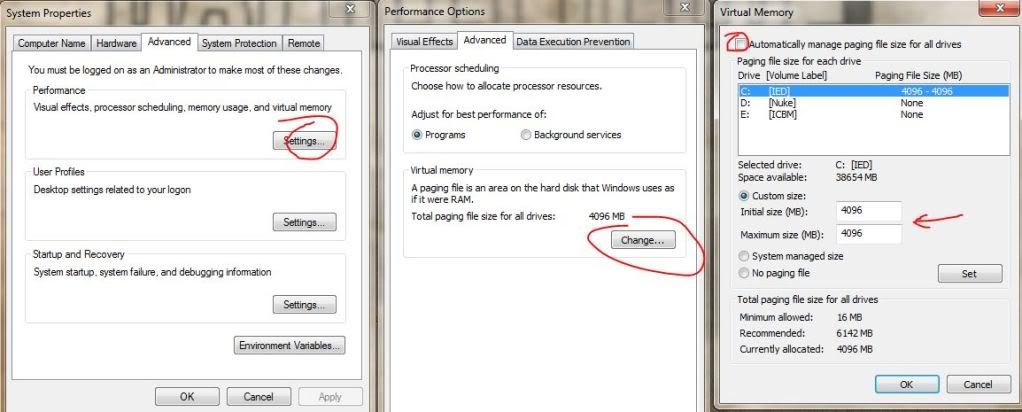
How to change pagefile size?
Right click on
Computer, select
Properties. Pick
Advanced System Settings
Then click on
Advanced card and under Performance click
Settings. Or just follow the screenshot below.
Click on another
Advanced card then
Change. In new window deselect "Automatically menage paging file size fol all drives" and pick what suits you the best.
I put mine at 4 GB. Imagine how much is this essential for your small SDD.
In part III we talk about System Restore and free cleaning tools.



0 comments:
Post a Comment