System Restore option is extremely useful tool which saved us numerous times from reinstalling the system. However, it can use a bunch of space. If you don't use it, you can disable it, but if we wouldn't recommend you that. You never know what could happen to your system.
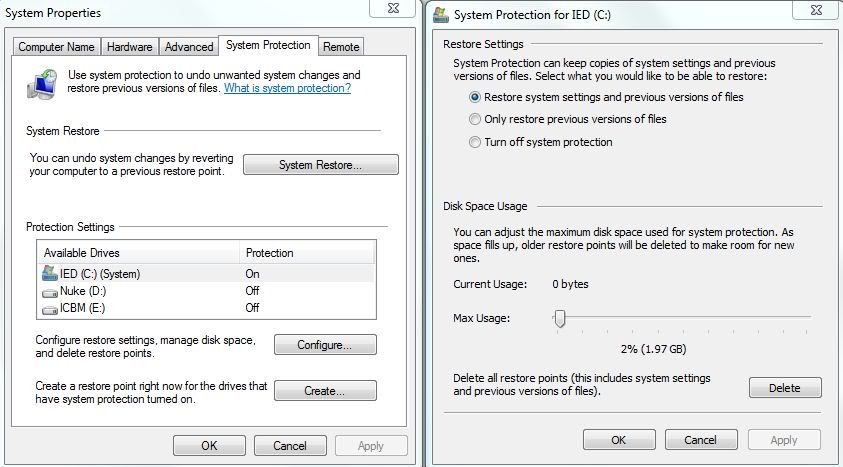
We'll get to it right clicking on the Computer > Properties > System Protection... now you can disable protection for non system drives because System Restore track changes in system files, registry and installed programs which are located on primary drive. Now go to Configure and move the slider to change max disc usage space for System Restore. Slide it max to 5%... everything above it is unnecessary. I put mine at 2% since I don't even use it, I keep it just in case.
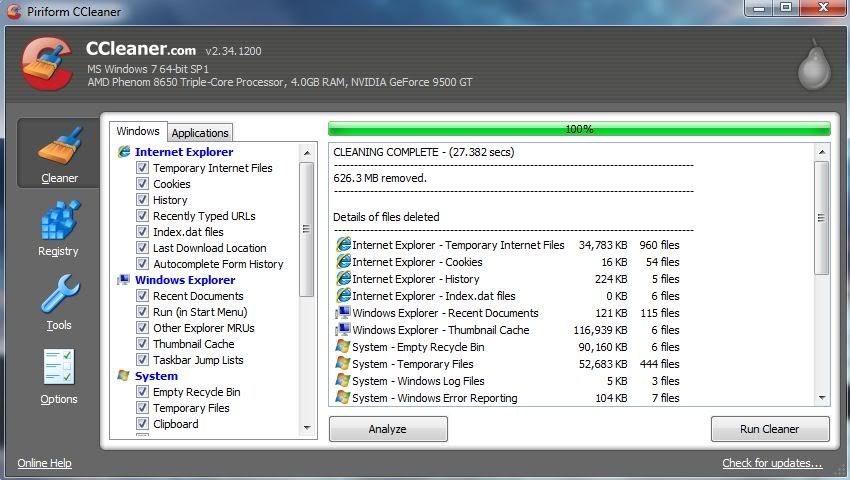
This amazing tool will help you clean all the unnecessary temporary files, cookies, cache, logs, even forgotten recycle bin. I cleaned my Firefox browser's cache then started cleaner... the result was ove 600+ MB... that's almost a whole GB. That's a lot cleaned space for small SDDs.
The other amazing thing is a registry cleaner. It cleans all unused registry entries, an application leftovers after uninstall.

That's it for today. See you soon with new ideas.

0 comments:
Post a Comment